
In March 2024, Google replaced First Input Delay (FID) with Interaction to Next Paint (INP) as a Core Web Vital. FID only tracked the first interaction delay. INP tracks every interaction during a user's entire session — clicks, taps, and keyboard inputs.
Pages with poor INP face measurable search ranking penalties. More importantly, they frustrate users, increase bounce rates, and reduce conversions. Our web development team has helped 30+ Indian businesses bring INP from "Poor" to "Good" — here's everything we've learned.
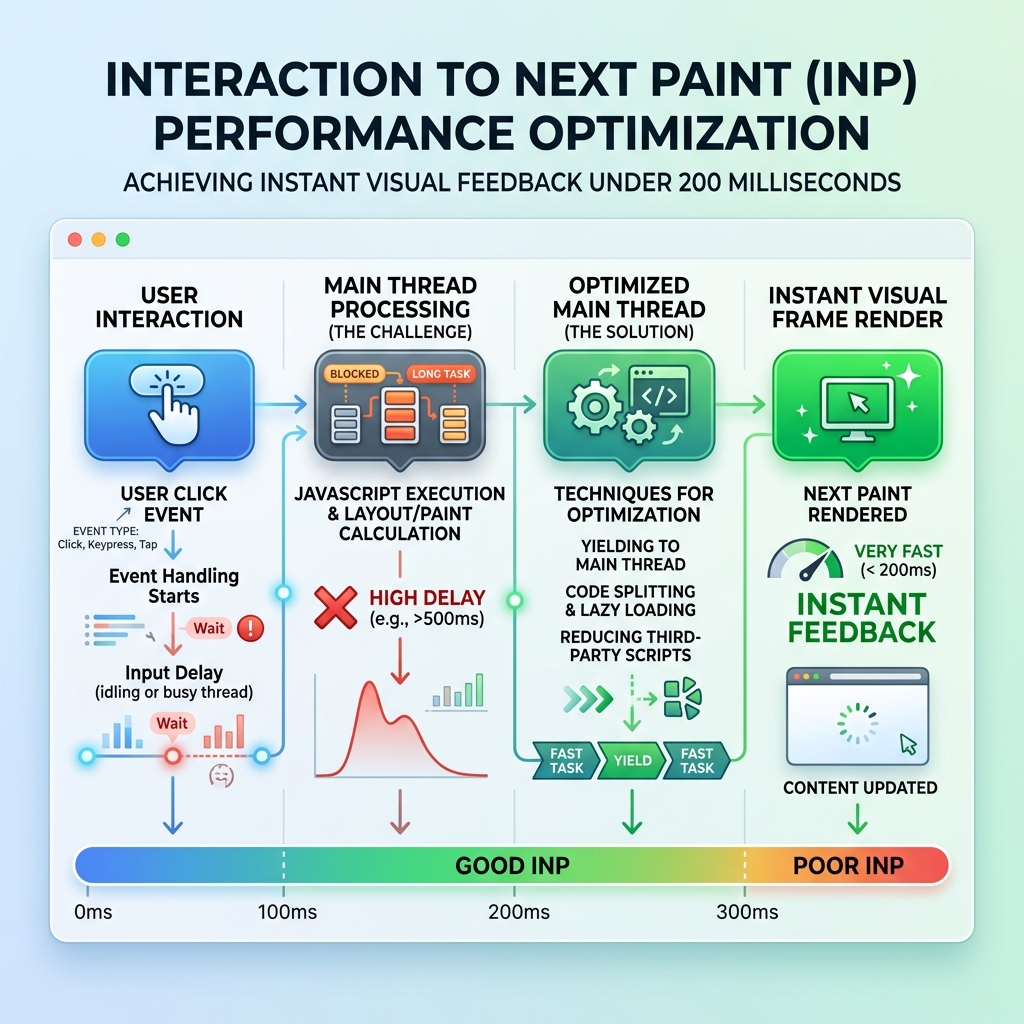
1. What Is INP and Why Google Made It a Core Vital
INP measures time from when a user initiates an interaction to when the browser visually responds ("next paint"). Google's thresholds:
- ✅ Good: INP <200ms — Users perceive instant responsiveness
- ⚠️ Needs Improvement: 200–500ms — Users notice lag
- ❌ Poor: INP >500ms — "Frozen page" syndrome → rage-clicks, abandonment
Vodafone found a 31% LCP improvement increased sales by 8%. For INP the relationship is even stronger — every 100ms reduction has measurable positive effect on form completions, CTA clicks, and checkout flow progression.
2. Top Causes of High INP Scores
- Long Tasks blocking main thread: Any JS task >50ms blocks browser from responding to user input. Common sources: third-party scripts, analytics, chat widgets
- Excessive DOM size: 5,000+ nodes makes style recalculation expensive on every interaction
- Synchronous event handlers: Heavy computation before allowing browser to paint
- Third-party scripts: GA4, Facebook Pixel, Intercom — each competes for main-thread time
- Render-blocking CSS in interactions: Dropdown expansions forcing full style recalculation
3. Top 5 Code-Level INP Fixes
Fix 1: Break Long Tasks with Yield Points
// Break massive functions with scheduler.yield():
async function processDataYielding(items) {
  for (const item of items) {
    heavyCalculation(item);
    await scheduler.yield(); // Let browser handle pending inputs
  }
}
Fix 2: Reduce DOM Below 1,500 Nodes — Use virtual scrolling (react-window) for long lists. Lazy-render off-screen components. Use display:none for hidden tab content instead of rendering everything upfront.
Fix 3: Defer Non-Critical Third-Party Scripts
<!-- Delay until user interaction: -->
<script>
  document.addEventListener('click', () => {
    const s = document.createElement('script');
    s.src = 'chat-widget.js';
    document.head.appendChild(s);
  }, { once: true });
</script>
Fix 4: Optimize Event Handlers — Debounce scroll/resize listeners. Use requestAnimationFrame for visual updates instead of synchronous DOM manipulation inside callbacks.
Fix 5: Web Workers for Heavy Computation
// Main thread stays responsive:
const worker = new Worker('heavy-calc.worker.js');
worker.postMessage({ data: largeDataset });
worker.onmessage = (e) => updateUI(e.data.result);
4. Measuring INP in Real Production
- CrUX (Chrome User Experience Report): Available in PageSpeed Insights and GSC — real user INP segmented by device
- web-vitals JS library: Capture real INP from actual users and send to GA4 custom events
- PerformanceObserver API: Use with
type: "event"entries to identify which specific interactions have highest latency
5. Framework-Specific INP Issues
- React: Use
useTransitionanduseDeferredValuefor non-urgent state updates. React 18 batching helps but complex state updates still block main thread - Vue: Vue 3's reactivity is more efficient but large component trees with many watchers add rendering overhead
- Angular: Zone.js triggers full component tree checks. Use
ChangeDetectionStrategy.OnPushto reduce re-renders dramatically
For JS-heavy SPAs, also read our JavaScript SEO for React apps — many INP fixes also improve Googlebot indexing simultaneously.
6. Continuous Monitoring Strategy
- Set up Lighthouse CI in your CI/CD pipeline to catch INP regressions before deployment
- Configure GSC alerts for Core Web Vitals status changes
- Review CrUX data monthly in PageSpeed Insights for top 10 pages
- Audit third-party scripts quarterly — they frequently introduce new regressions
If your site consistently fails INP despite these fixes, WebDuo's web performance optimization provides deep JS profiling and architecture-level solutions. Request a free performance audit.